Add Products
- Make an Add Product Dialog
- Show the Dialog
- Implement Dialog Buttons
- Improve the User Experience
- Complete Code for This Step
- Next Steps
In the previous steps, you built a drawer for editing the details of the currently selected item in the product catalog. However, there was no way of adding new items. You’ll be addressing this in this step. However, instead of using the drawer again, you’ll be making a dialog.
|
Tip
|
Dialog or Drawer?
Editing an item is inherently contextual; it only makes sense when there is a selected item. Because of this, the drawer is explicitly tied to the selection in the UI. Creating a new item is not tied to any existing selection. A dialog communicates that distinction clearly: it represents a new, temporary interaction that is independent of the current view state. By separating creation into a dialog, the UI makes it obvious that the user is not editing something that already exists, but defining something new. |
You’ll start by creating the dialog and adding a button for opening it to the product catalog view. You’ll then add the necessary logic to insert new products into the database, refresh the grid, and handle any errors that may occur. Finally, you’ll make some improvements to the user experience.
Make an Add Product Dialog
You’ll now create a Dialog for adding new products to the catalog. A dialog in Vaadin extends the Dialog class. It has a header, a footer, and a content area, and it can be opened and closed.
You’ll reuse the ProductForm from the earlier steps and display that in the content area. You’ll add two buttons to the footer: a Save button for inserting the new product, and a Cancel button for closing the dialog without saving.
Create a new AddProductDialog class like this:
Source code
AddProductDialog.java
package com.example.product;

import com.vaadin.flow.component.button.Button;
import com.vaadin.flow.component.button.ButtonVariant;
import com.vaadin.flow.component.dialog.Dialog;

class AddProductDialog extends Dialog {

    private final ProductForm form;

    AddProductDialog() {
        // Create components
        form = new ProductForm();
        var saveButton = new Button("Save");
        saveButton.addThemeVariants(ButtonVariant.PRIMARY);
        var cancelButton = new Button("Cancel");

        // Layout dialog
        setHeaderTitle("Add Product"); 1
        add(form); 2
        getFooter().add(cancelButton, saveButton); 3
    }
}-
The header contains a title.
-
The content area contains the product form itself.
-
The footer contains Cancel and Save buttons.
Whenever you build any user interface element in Vaadin, you want to see what it looks like as quickly as possible. To see what the AddProductDialog looks like, you have to open it somewhere in your application. You’ll do that next.
Show the Dialog
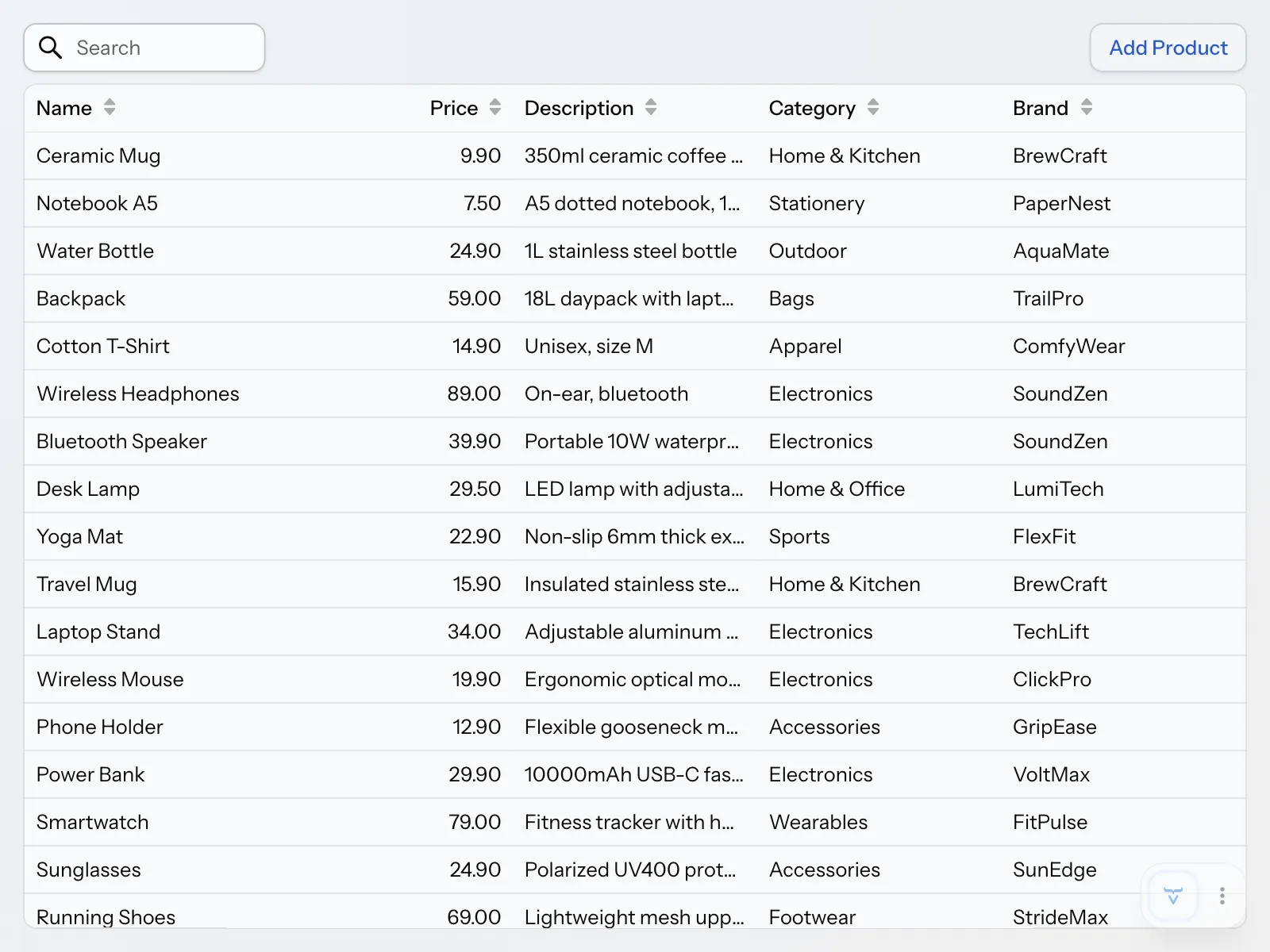
To add a new product, the user should click an Add Product button in the product catalog view. The button should show up on the same row as the search field, but in the top-right corner of the screen. To implement this, you have to do two things:
-
Create a new
Buttonthat opensAddProductDialogwhen clicked. -
Move the search field into a new toolbar, and also add the button to it.
Change the code of ProductCatalogView as follows:
Source code
ProductCatalogView.java
package com.example.product;

import com.vaadin.flow.component.button.Button;
import com.vaadin.flow.component.grid.ColumnTextAlign;
import com.vaadin.flow.component.grid.Grid;
import com.vaadin.flow.component.icon.VaadinIcon;
import com.vaadin.flow.component.masterdetaillayout.MasterDetailLayout;
import com.vaadin.flow.component.notification.Notification;
import com.vaadin.flow.component.notification.NotificationVariant;
import com.vaadin.flow.component.orderedlayout.HorizontalLayout;
import com.vaadin.flow.component.orderedlayout.VerticalLayout;
import com.vaadin.flow.component.textfield.TextField;
import com.vaadin.flow.data.value.ValueChangeMode;
import com.vaadin.flow.router.PageTitle;
import com.vaadin.flow.router.Route;
import org.springframework.dao.OptimisticLockingFailureException;

@Route("")
@PageTitle("Product Catalog")
class ProductCatalogView extends MasterDetailLayout {

    ProductCatalogView(ProductCatalogService service) {
        // Create components
        var searchField = new TextField();
        searchField.setPlaceholder("Search");
        searchField.setPrefixComponent(VaadinIcon.SEARCH.create());
        searchField.setValueChangeMode(ValueChangeMode.LAZY);

        var grid = new Grid<ProductCatalogItem>();
        grid.addColumn(ProductCatalogItem::name)
            .setHeader("Name")
            .setSortProperty(ProductCatalogItem.SORT_PROPERTY_NAME);
        grid.addColumn(ProductCatalogItem::price)
            .setHeader("Price")
            .setTextAlign(ColumnTextAlign.END)
            .setSortProperty(ProductCatalogItem.SORT_PROPERTY_PRICE);
        grid.addColumn(ProductCatalogItem::description)
            .setHeader("Description")
            .setSortProperty(ProductCatalogItem.SORT_PROPERTY_DESCRIPTION);
        grid.addColumn(ProductCatalogItem::category)
            .setHeader("Category")
            .setSortProperty(ProductCatalogItem.SORT_PROPERTY_CATEGORY);
        grid.addColumn(ProductCatalogItem::brand)
            .setHeader("Brand")
            .setSortProperty(ProductCatalogItem.SORT_PROPERTY_BRAND);
        grid.setItemsPageable(pageable -> service
            .findItems(searchField.getValue(), pageable)
        ).setIdentifierProvider(ProductCatalogItem::productId);

        var drawer = new ProductFormDrawer(productDetails -> {
            var saved = service.save(productDetails);
            grid.getDataProvider().refreshAll();
            return saved;
        }, productDetails -> {
            service.delete(productDetails);
            grid.deselectAll();
            grid.getDataProvider().refreshAll();
        }, this::handleException);

        searchField.addValueChangeListener(e ->
                grid.getDataProvider().refreshAll());

        grid.addSelectionListener(e -> {
            var productDetails = e.getFirstSelectedItem()
                .flatMap(item -> service.findDetailsById(item.productId()));
            productDetails.ifPresent(drawer::setProductDetails);
            setDetail(productDetails.isPresent() ? drawer : null);
        });
        addBackdropClickListener(e -> grid.deselectAll());
        addDetailEscapePressListener(e -> grid.deselectAll());

        var addButton = new Button("Add Product",
            e -> new AddProductDialog().open()); 1

        // Layout view
        setSizeFull();
        setDetailSize("300px");
        setExpandMaster(true);

        var toolbar = new HorizontalLayout(); 2
        toolbar.setWidthFull(); 3
        toolbar.addToStart(searchField); 4
        toolbar.addToEnd(addButton); 5

        var listLayout = new VerticalLayout(toolbar, grid);
        listLayout.setSizeFull();
        grid.setSizeFull();

        setMaster(listLayout);
    }

    private void handleException(RuntimeException exception) {
        if (exception instanceof OptimisticLockingFailureException) {
            var notification = new Notification(
                "Another user has edited the same product. "
                + "Please refresh and try again.");
            notification.setPosition(Notification.Position.MIDDLE);
            notification.addThemeVariants(NotificationVariant.WARNING);
            notification.setDuration(3000);
            notification.open();
        } else {
            // Delegate to Vaadin's default error handler
            throw exception;
        }
    }
}-
Open the dialog by calling the
open()method. -
The toolbar is a horizontal layout.
-
Make the toolbar take the full width of the view. By default, it only expands to fit the components within it.
-
Add the search field to the start of the toolbar, making it show up in the top-left corner of the screen.
-
Add the button to the end of the toolbar, making it show up in the top-right corner of the screen.
The product catalog view should now look like this:
Click the button to open the dialog. It should look like this:
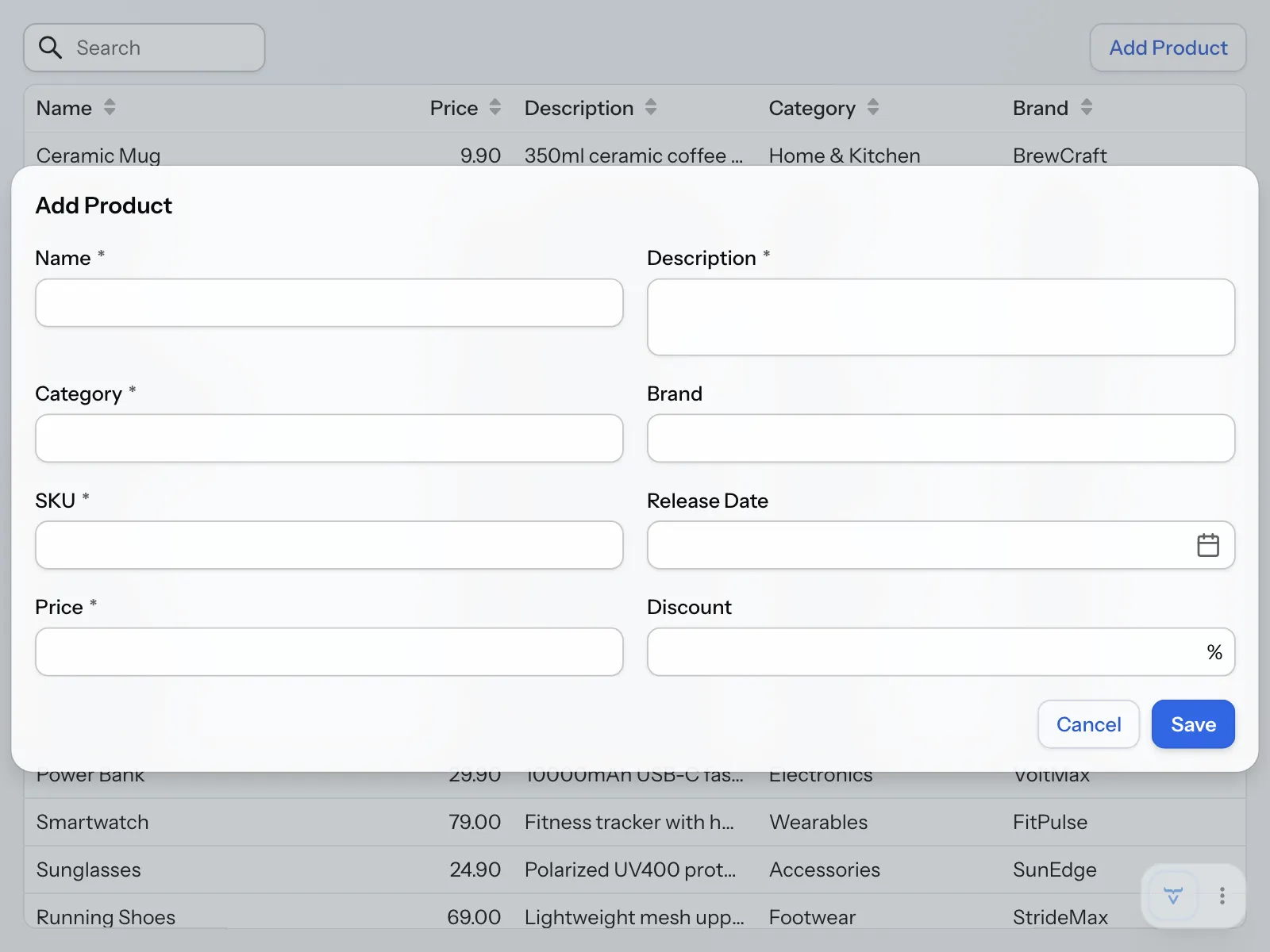
You’ll notice the form looks different than the drawer. This is because the Form Layout component is responsive out-of-the-box and automatically determines the number of columns based on various parameters, such as available horizontal space.
Close the dialog by pressing Esc or clicking outside the dialog. You’ll add functionality to the dialog buttons next.
Implement Dialog Buttons
The Cancel button is trivial to implement: it should close the dialog when clicked. You do this by calling the close() method in the button’s click listener.
The Save button is more interesting: it should validate the form, insert the product into the catalog, refresh the grid, and close the dialog. You’ll use the same callback based design pattern that you used in ProductFormDrawer. This keeps the coding style consistent and also allows you to reuse some logic from ProductCatalogView.
Update AddProductDialog as follows:
Source code
AddProductDialog.java
package com.example.product;

import com.vaadin.flow.component.button.Button;
import com.vaadin.flow.component.button.ButtonVariant;
import com.vaadin.flow.component.dialog.Dialog;

class AddProductDialog extends Dialog {

    @FunctionalInterface
    interface SaveCallback {
        void save(ProductDetails productDetails); 1
    }

    @FunctionalInterface
    interface ErrorCallback {
        void handleException(RuntimeException e);
    }
    private final SaveCallback saveCallback;
    private final ErrorCallback errorCallback;
    private final ProductForm form;

    AddProductDialog(SaveCallback saveCallback, ErrorCallback errorCallback) {
        this.saveCallback = saveCallback;
        this.errorCallback = errorCallback;

        // Create components
        form = new ProductForm();
        form.setFormDataObject(new ProductDetails()); 2
        var saveButton = new Button("Save", e -> save());
        saveButton.addThemeVariants(ButtonVariant.PRIMARY);
        var cancelButton = new Button("Cancel", e -> close());

        // Layout dialog
        setHeaderTitle("Add Product");
        add(form);
        getFooter().add(cancelButton, saveButton);
    }

    private void save() { 3
        form.getFormDataObject().ifPresent(productDetails -> {
            try {
                saveCallback.save(productDetails);
                close();
            } catch (RuntimeException e) {
                errorCallback.handleException(e);
            }
        });
    }
}-
This save callback doesn’t need to return an object, since the dialog closes on success.
-
Create a new, empty form data object for each dialog instance.
-
This is almost the same implementation as in
ProductFormDrawer, but instead of re-populating the form with a new FDO it closes the dialog.
Next, implement the callbacks in ProductCatalogView:
Source code
ProductCatalogView.java
package com.example.product;

import com.vaadin.flow.component.button.Button;
import com.vaadin.flow.component.grid.ColumnTextAlign;
import com.vaadin.flow.component.grid.Grid;
import com.vaadin.flow.component.icon.VaadinIcon;
import com.vaadin.flow.component.masterdetaillayout.MasterDetailLayout;
import com.vaadin.flow.component.notification.Notification;
import com.vaadin.flow.component.notification.NotificationVariant;
import com.vaadin.flow.component.orderedlayout.HorizontalLayout;
import com.vaadin.flow.component.orderedlayout.VerticalLayout;
import com.vaadin.flow.component.textfield.TextField;
import com.vaadin.flow.data.value.ValueChangeMode;
import com.vaadin.flow.router.PageTitle;
import com.vaadin.flow.router.Route;
import org.springframework.dao.OptimisticLockingFailureException;

@Route("")
@PageTitle("Product Catalog")
class ProductCatalogView extends MasterDetailLayout {

    ProductCatalogView(ProductCatalogService service) {
        // Create components
        var searchField = new TextField();
        searchField.setPlaceholder("Search");
        searchField.setPrefixComponent(VaadinIcon.SEARCH.create());
        searchField.setValueChangeMode(ValueChangeMode.LAZY);

        var grid = new Grid<ProductCatalogItem>();
        grid.addColumn(ProductCatalogItem::name)
            .setHeader("Name")
            .setSortProperty(ProductCatalogItem.SORT_PROPERTY_NAME);
        grid.addColumn(ProductCatalogItem::price)
            .setHeader("Price")
            .setTextAlign(ColumnTextAlign.END)
            .setSortProperty(ProductCatalogItem.SORT_PROPERTY_PRICE);
        grid.addColumn(ProductCatalogItem::description)
            .setHeader("Description")
            .setSortProperty(ProductCatalogItem.SORT_PROPERTY_DESCRIPTION);
        grid.addColumn(ProductCatalogItem::category)
            .setHeader("Category")
            .setSortProperty(ProductCatalogItem.SORT_PROPERTY_CATEGORY);
        grid.addColumn(ProductCatalogItem::brand)
            .setHeader("Brand")
            .setSortProperty(ProductCatalogItem.SORT_PROPERTY_BRAND);
        grid.setItemsPageable(pageable -> service
            .findItems(searchField.getValue(), pageable)
        ).setIdentifierProvider(ProductCatalogItem::productId);

        var drawer = new ProductFormDrawer(productDetails -> {
            var saved = service.save(productDetails);
            grid.getDataProvider().refreshAll();
            return saved;
        }, productDetails -> {
            service.delete(productDetails);
            grid.deselectAll();
            grid.getDataProvider().refreshAll();
        }, this::handleException);

        searchField.addValueChangeListener(e ->
                grid.getDataProvider().refreshAll());

        grid.addSelectionListener(e -> {
            var productDetails = e.getFirstSelectedItem()
                .flatMap(item -> service.findDetailsById(item.productId()));
            productDetails.ifPresent(drawer::setProductDetails);
            setDetail(productDetails.isPresent() ? drawer : null);
        });
        addBackdropClickListener(e -> grid.deselectAll());
        addDetailEscapePressListener(e -> grid.deselectAll());

        var addButton = new Button("Add Product", e ->
            new AddProductDialog(
                productDetails -> {
                    service.save(productDetails); 1
                    grid.getDataProvider().refreshAll(); 2
                },
                this::handleException 3
            ).open()
        );

        // Layout view
        setSizeFull();
        setDetailSize("300px");
        setExpandMaster(true);

        var toolbar = new HorizontalLayout();
        toolbar.setWidthFull();
        toolbar.addToStart(searchField);
        toolbar.addToEnd(addButton);

        var listLayout = new VerticalLayout(toolbar, grid);
        listLayout.setSizeFull();
        grid.setSizeFull();

        setMaster(listLayout);
    }

    private void handleException(RuntimeException exception) {
        if (exception instanceof OptimisticLockingFailureException) {
            var notification = new Notification(
                "Another user has edited the same product. "
                + "Please refresh and try again.");
            notification.setPosition(Notification.Position.MIDDLE);
            notification.addThemeVariants(NotificationVariant.WARNING);
            notification.setDuration(3000);
            notification.open();
        } else {
            // Delegate to Vaadin's default error handler
            throw exception;
        }
    }
}-
Call the service to validate the product and insert it into the database.
-
Refresh the grid so that the new product shows up.
-
Re-use the
handleException()method for error handling.
You should now be able to add new products to the database, and they should show up in the grid.
Improve the User Experience
When you implemented edit support in the previous tutorial step, you stumbled upon and fixed some user experience issues. You’ll now fix two more issues.
You may have noticed that every new item is added to the bottom of the grid unless it has been explicitly sorted by a particular column. This is because the grid is sorted by ID by default. You have to scroll down to see whether the item was actually added. This creates unnecessary confusion for the user and could be improved.
Next, try to insert a product with the following Stock Keeping Unit (SKU): NBK-A5-DOT
The dialog should remain open and in the console output, you should see the following error:
org.h2.jdbc.JdbcSQLIntegrityConstraintViolationException: Unique index or primary key violation: "PUBLIC.CONSTRAINT_F2 INDEX PUBLIC.CONSTRAINT_INDEX_F ON PUBLIC.PRODUCTS(SKU NULLS FIRST) VALUES ( /* 2 */ 'NBK-A5-DOT' )";
This is another example of a recoverable error triggered by a user action, and should be addressed.
Select Added Item
To make the experience less confusing for users, you’ll select the newly added item after refreshing the product catalog grid. However, because the grid contains objects of type ProductCatalogItem, and the form uses ProductDetails, you have to find the corresponding item to select it.
To do this, you first have to add a new findById method to ProductCatalogItemRepository:
Source code
ProductCatalogItemRepository.java
package com.example.product;

import org.springframework.data.domain.Pageable;
import org.springframework.data.domain.Slice;
import org.springframework.data.repository.PagingAndSortingRepository;

import java.util.Optional;

interface ProductCatalogItemRepository
    extends PagingAndSortingRepository<ProductCatalogItem, Long> {

    Optional<ProductCatalogItem> findById(Long id);
    Slice<ProductCatalogItem> findByNameContainingIgnoreCase(String name,
        Pageable pageable);
}
Spring Data automatically implements the method for you.
Then make the method available to the view by adding a findItemById method to ProductCatalogService:
Source code
ProductCatalogService.java
package com.example.product;

import jakarta.validation.Valid;
import org.springframework.data.domain.Pageable;
import org.springframework.stereotype.Service;
import org.springframework.transaction.annotation.Transactional;
import org.springframework.validation.annotation.Validated;

import java.util.List;
import java.util.Optional;

@Service
@Validated
@Transactional(readOnly = true)
class ProductCatalogService {

    private final ProductCatalogItemRepository productCatalogItemRepository;
    private final ProductDetailsRepository productDetailsRepository;

    public ProductCatalogService(
            ProductCatalogItemRepository productCatalogItemRepository,
            ProductDetailsRepository productDetailsRepository) {
        this.productCatalogItemRepository = productCatalogItemRepository;
        this.productDetailsRepository = productDetailsRepository;
    }

    public List<ProductCatalogItem> findItems(String searchTerm,
            Pageable pageable) {
        return productCatalogItemRepository
            .findByNameContainingIgnoreCase(searchTerm, pageable).getContent();
    }

    public Optional<ProductDetails> findDetailsById(Long id) {
        return productDetailsRepository.findById(id);
    }

    public Optional<ProductCatalogItem> findItemById(Long id) {
        return productCatalogItemRepository.findById(id);
    }

    @Transactional
    public ProductDetails save(@Valid ProductDetails productDetails) {
        return productDetailsRepository.save(productDetails);
    }

    @Transactional
    public void delete(ProductDetails productDetails) {
        productDetailsRepository.delete(productDetails);
    }
}
Next, call the method to retrieve the ProductCatalogItem after having inserted a new ProductDetails. Modify the save callback in ProductCatalogView as follows:
Source code
ProductCatalogView.java
package com.example.product;

import com.vaadin.flow.component.button.Button;
import com.vaadin.flow.component.grid.ColumnTextAlign;
import com.vaadin.flow.component.grid.Grid;
import com.vaadin.flow.component.icon.VaadinIcon;
import com.vaadin.flow.component.masterdetaillayout.MasterDetailLayout;
import com.vaadin.flow.component.notification.Notification;
import com.vaadin.flow.component.notification.NotificationVariant;
import com.vaadin.flow.component.orderedlayout.HorizontalLayout;
import com.vaadin.flow.component.orderedlayout.VerticalLayout;
import com.vaadin.flow.component.textfield.TextField;
import com.vaadin.flow.data.value.ValueChangeMode;
import com.vaadin.flow.router.PageTitle;
import com.vaadin.flow.router.Route;
import org.springframework.dao.OptimisticLockingFailureException;

@Route("")
@PageTitle("Product Catalog")
class ProductCatalogView extends MasterDetailLayout {

    ProductCatalogView(ProductCatalogService service) {
        // Create components
        var searchField = new TextField();
        searchField.setPlaceholder("Search");
        searchField.setPrefixComponent(VaadinIcon.SEARCH.create());
        searchField.setValueChangeMode(ValueChangeMode.LAZY);

        var grid = new Grid<ProductCatalogItem>();
        grid.addColumn(ProductCatalogItem::name)
            .setHeader("Name")
            .setSortProperty(ProductCatalogItem.SORT_PROPERTY_NAME);
        grid.addColumn(ProductCatalogItem::price)
            .setHeader("Price")
            .setTextAlign(ColumnTextAlign.END)
            .setSortProperty(ProductCatalogItem.SORT_PROPERTY_PRICE);
        grid.addColumn(ProductCatalogItem::description)
            .setHeader("Description")
            .setSortProperty(ProductCatalogItem.SORT_PROPERTY_DESCRIPTION);
        grid.addColumn(ProductCatalogItem::category)
            .setHeader("Category")
            .setSortProperty(ProductCatalogItem.SORT_PROPERTY_CATEGORY);
        grid.addColumn(ProductCatalogItem::brand)
            .setHeader("Brand")
            .setSortProperty(ProductCatalogItem.SORT_PROPERTY_BRAND);
        grid.setItemsPageable(pageable -> service
            .findItems(searchField.getValue(), pageable)
        ).setIdentifierProvider(ProductCatalogItem::productId);

        var drawer = new ProductFormDrawer(productDetails -> {
            var saved = service.save(productDetails);
            grid.getDataProvider().refreshAll();
            return saved;
        }, productDetails -> {
            service.delete(productDetails);
            grid.deselectAll();
            grid.getDataProvider().refreshAll();
        }, this::handleException);

        searchField.addValueChangeListener(e ->
                grid.getDataProvider().refreshAll());

        grid.addSelectionListener(e -> {
            var productDetails = e.getFirstSelectedItem()
                .flatMap(item -> service.findDetailsById(item.productId()));
            productDetails.ifPresent(drawer::setProductDetails);
            setDetail(productDetails.isPresent() ? drawer : null);
        });
        addBackdropClickListener(e -> grid.deselectAll());
        addDetailEscapePressListener(e -> grid.deselectAll());

        var addButton = new Button("Add Product", e ->
            new AddProductDialog(
                productDetails -> {
                    var saved = service.save(productDetails);
                    grid.getDataProvider().refreshAll();
                    service.findItemById(saved.getProductId())
                           .ifPresent(grid::select);
                },
                this::handleException
            ).open()
        );

        // Layout view
        setSizeFull();
        setDetailSize("300px");
        setExpandMaster(true);

        var toolbar = new HorizontalLayout();
        toolbar.setWidthFull();
        toolbar.addToStart(searchField);
        toolbar.addToEnd(addButton);

        var listLayout = new VerticalLayout(toolbar, grid);
        listLayout.setSizeFull();
        grid.setSizeFull();

        setMaster(listLayout);
    }

    private void handleException(RuntimeException exception) {
        if (exception instanceof OptimisticLockingFailureException) {
            var notification = new Notification(
                "Another user has edited the same product. "
                + "Please refresh and try again.");
            notification.setPosition(Notification.Position.MIDDLE);
            notification.addThemeVariants(NotificationVariant.WARNING);
            notification.setDuration(3000);
            notification.open();
        } else {
            // Delegate to Vaadin's default error handler
            throw exception;
        }
    }
}
Restart the application, since you changed a repository interface. Now when you add a new product, it should automatically be selected and show up in the drawer.
Handle Constraint Violation
Next, you’ll handle the duplicate SKU. Spring translates database errors into its own exception hierarchy, and reports a violation of a unique constraint as a DuplicateKeyException. Since sku is the only unique column in the PRODUCTS table apart from the generated ID, a DuplicateKeyException from saving a product means that the SKU is already in use.
Catch DuplicateKeyException rather than its superclass, DataIntegrityViolationException. The superclass also covers other violations, such as a negative price, and reporting those as a duplicate SKU would confuse the user. Since the service validates the input, such violations shouldn’t reach the database. If one does, it’s a bug, and belongs in Vaadin’s default error handler.
Update the handleException() method in ProductCatalogView as follows:
Source code
ProductCatalogView.java
package com.example.product;

import com.vaadin.flow.component.button.Button;
import com.vaadin.flow.component.grid.ColumnTextAlign;
import com.vaadin.flow.component.grid.Grid;
import com.vaadin.flow.component.icon.VaadinIcon;
import com.vaadin.flow.component.masterdetaillayout.MasterDetailLayout;
import com.vaadin.flow.component.notification.Notification;
import com.vaadin.flow.component.notification.NotificationVariant;
import com.vaadin.flow.component.orderedlayout.HorizontalLayout;
import com.vaadin.flow.component.orderedlayout.VerticalLayout;
import com.vaadin.flow.component.textfield.TextField;
import com.vaadin.flow.data.value.ValueChangeMode;
import com.vaadin.flow.router.PageTitle;
import com.vaadin.flow.router.Route;
import org.springframework.dao.DuplicateKeyException;
import org.springframework.dao.OptimisticLockingFailureException;

@Route("")
@PageTitle("Product Catalog")
class ProductCatalogView extends MasterDetailLayout {

    ProductCatalogView(ProductCatalogService service) {
        // Create components
        var searchField = new TextField();
        searchField.setPlaceholder("Search");
        searchField.setPrefixComponent(VaadinIcon.SEARCH.create());
        searchField.setValueChangeMode(ValueChangeMode.LAZY);

        var grid = new Grid<ProductCatalogItem>();
        grid.addColumn(ProductCatalogItem::name)
            .setHeader("Name")
            .setSortProperty(ProductCatalogItem.SORT_PROPERTY_NAME);
        grid.addColumn(ProductCatalogItem::price)
            .setHeader("Price")
            .setTextAlign(ColumnTextAlign.END)
            .setSortProperty(ProductCatalogItem.SORT_PROPERTY_PRICE);
        grid.addColumn(ProductCatalogItem::description)
            .setHeader("Description")
            .setSortProperty(ProductCatalogItem.SORT_PROPERTY_DESCRIPTION);
        grid.addColumn(ProductCatalogItem::category)
            .setHeader("Category")
            .setSortProperty(ProductCatalogItem.SORT_PROPERTY_CATEGORY);
        grid.addColumn(ProductCatalogItem::brand)
            .setHeader("Brand")
            .setSortProperty(ProductCatalogItem.SORT_PROPERTY_BRAND);
        grid.setItemsPageable(pageable -> service
            .findItems(searchField.getValue(), pageable)
        ).setIdentifierProvider(ProductCatalogItem::productId);

        var drawer = new ProductFormDrawer(productDetails -> {
            var saved = service.save(productDetails);
            grid.getDataProvider().refreshAll();
            return saved;
        }, productDetails -> {
            service.delete(productDetails);
            grid.deselectAll();
            grid.getDataProvider().refreshAll();
        }, this::handleException);

        searchField.addValueChangeListener(e ->
                grid.getDataProvider().refreshAll());

        grid.addSelectionListener(e -> {
            var productDetails = e.getFirstSelectedItem()
                .flatMap(item -> service.findDetailsById(item.productId()));
            productDetails.ifPresent(drawer::setProductDetails);
            setDetail(productDetails.isPresent() ? drawer : null);
        });
        addBackdropClickListener(e -> grid.deselectAll());
        addDetailEscapePressListener(e -> grid.deselectAll());

        var addButton = new Button("Add Product", e ->
            new AddProductDialog(
                productDetails -> {
                    var saved = service.save(productDetails);
                    grid.getDataProvider().refreshAll();
                    service.findItemById(saved.getProductId())
                           .ifPresent(grid::select);
                },
                this::handleException
            ).open()
        );

        // Layout view
        setSizeFull();
        setDetailSize("300px");
        setExpandMaster(true);

        var toolbar = new HorizontalLayout();
        toolbar.setWidthFull();
        toolbar.addToStart(searchField);
        toolbar.addToEnd(addButton);

        var listLayout = new VerticalLayout(toolbar, grid);
        listLayout.setSizeFull();
        grid.setSizeFull();

        setMaster(listLayout);
    }

    private void handleException(RuntimeException exception) {
        if (exception instanceof OptimisticLockingFailureException) {
            var notification = new Notification(
                "Another user has edited the same product. "
                + "Please refresh and try again.");
            notification.setPosition(Notification.Position.MIDDLE);
            notification.addThemeVariants(NotificationVariant.WARNING);
            notification.setDuration(3000);
            notification.open();
        } else if (exception instanceof DuplicateKeyException) {
            var notification = new Notification(
                "The SKU is already in use. Please enter another one.");
            notification.setPosition(Notification.Position.MIDDLE);
            notification.addThemeVariants(NotificationVariant.WARNING);
            notification.setDuration(3000);
            notification.open();
        } else {
            // Delegate to Vaadin's default error handler
            throw exception;
        }
    }
}
Now try to create a new item with the SKU NBK-A5-DOT. You should receive a notification asking you to enter another SKU. Enter another one and click save. This should have worked, right? But it didn’t. Instead you ended up with a different notification:
Another user has edited the same product. Please refresh and try again.
How is this possible? How can another user have edited a product that you haven’t even inserted yet?
You have now run into a problem that can happen whenever a form keeps editing the same mutable object across saves, like ProductDetails in this case. Spring Data changes the object while saving it, and a rolled-back transaction doesn’t undo that change.
Here’s what happened:
-
You clicked Save with a duplicate SKU.
-
Spring Data attempted to insert the product and set its version number to 1.
-
The database rejected the insert due to the duplicate SKU, and the transaction rolled back.
-
However, the
ProductDetailsobject in memory was not rolled back - it still has version=1. -
You changed the SKU and clicked Save again.
-
Spring Data saw that the version was already set and assumed this was an existing entity that needed updating, not a new one.
-
The update failed because no such row exists in the database — hence the optimistic locking error.
If this had been a REST API, the ProductDetails object would always be a new instance and this would not be a problem. Since you’re reusing the object, you have to work around this problem. You can do this in different ways, but the user interface shouldn’t need to know about any of them. It’s a persistence detail, and the view already saves products through ProductCatalogService. That makes the service the right place for the workaround.
Save a Copy of the Product
The easiest ways to avoid this problem are the following:
-
Set the version to
nullbefore saving an item that doesn’t yet have an ID. -
Make a copy of the object and pass the copy to the repository, then return it if successful.
Making a copy is more elegant because it ensures the original object remains unchanged until the transaction commits successfully. This follows a principle of keeping data objects immutable during uncertain operations. Also, you have already designed your UI callbacks to support backends that return new instances of data objects after saving them.
This problem is a cost of using the entity as the FDO. A separate FDO would avoid it as well, because the form would never hold the object that Spring Data changes. Copying the entity before saving gives the same protection without a second class, which is enough while the form and the table match one-to-one.
Start by adding two constructors to ProductDetails - a default constructor for creating new instances, and a copy constructor for creating copies:
Source code
ProductDetails.java
package com.example.product;

import jakarta.validation.constraints.DecimalMax;
import jakarta.validation.constraints.DecimalMin;
import jakarta.validation.constraints.NotBlank;
import jakarta.validation.constraints.NotNull;
import jakarta.validation.constraints.PositiveOrZero;
import jakarta.validation.constraints.Size;
import org.springframework.data.annotation.Id;
import org.springframework.data.annotation.Version;
import org.springframework.data.relational.core.mapping.Table;

import java.math.BigDecimal;
import java.time.LocalDate;

@Table("PRODUCTS")
class ProductDetails {

    @Id
    private Long productId;
    @Version
    private Long version;
    @NotBlank @Size(max = 100)
    private String name;
    @NotBlank @Size(max = 500)
    private String description;
    @NotBlank @Size(max = 100)
    private String category;
    @Size(max = 100)
    private String brand;
    @NotBlank @Size(max = 50)
    private String sku;
    private LocalDate releaseDate;
    @NotNull @PositiveOrZero
    private BigDecimal price;
    @DecimalMin("0") @DecimalMax("100")
    private BigDecimal discount;

    public ProductDetails() {
    }

    public ProductDetails(ProductDetails original) {
        this.productId = original.productId;
        this.version = original.version;
        this.name = original.name;
        this.description = original.description;
        this.category = original.category;
        this.brand = original.brand;
        this.sku = original.sku;
        this.releaseDate = original.releaseDate;
        this.price = original.price;
        this.discount = original.discount;
    }

    public Long getProductId() {
        return productId;
    }

    public Long getVersion() {
        return version;
    }

    public String getName() {
        return name;
    }

    public void setName(String name) {
        this.name = name;
    }

    public String getDescription() {
        return description;
    }

    public void setDescription(String description) {
        this.description = description;
    }

    public String getCategory() {
        return category;
    }

    public void setCategory(String category) {
        this.category = category;
    }

    public String getBrand() {
        return brand;
    }

    public void setBrand(String brand) {
        this.brand = brand;
    }

    public String getSku() {
        return sku;
    }

    public void setSku(String sku) {
        this.sku = sku;
    }

    public LocalDate getReleaseDate() {
        return releaseDate;
    }

    public void setReleaseDate(LocalDate releaseDate) {
        this.releaseDate = releaseDate;
    }

    public BigDecimal getPrice() {
        return price;
    }

    public void setPrice(BigDecimal price) {
        this.price = price;
    }

    public BigDecimal getDiscount() {
        return discount;
    }

    public void setDiscount(BigDecimal discount) {
        this.discount = discount;
    }
}
Next, update the ProductCatalogService so that it passes a copy of ProductDetails to the repository:
Source code
ProductCatalogService.java
package com.example.product;

import jakarta.validation.Valid;
import org.springframework.data.domain.Pageable;
import org.springframework.stereotype.Service;
import org.springframework.transaction.annotation.Transactional;
import org.springframework.validation.annotation.Validated;

import java.util.List;
import java.util.Optional;

@Service
@Validated
@Transactional(readOnly = true)
class ProductCatalogService {

    private final ProductCatalogItemRepository productCatalogItemRepository;
    private final ProductDetailsRepository productDetailsRepository;

    public ProductCatalogService(
            ProductCatalogItemRepository productCatalogItemRepository,
            ProductDetailsRepository productDetailsRepository) {
        this.productCatalogItemRepository = productCatalogItemRepository;
        this.productDetailsRepository = productDetailsRepository;
    }

    public List<ProductCatalogItem> findItems(String searchTerm,
            Pageable pageable) {
        return productCatalogItemRepository
            .findByNameContainingIgnoreCase(searchTerm, pageable).getContent();
    }

    public Optional<ProductDetails> findDetailsById(Long id) {
        return productDetailsRepository.findById(id);
    }

    public Optional<ProductCatalogItem> findItemById(Long id) {
        return productCatalogItemRepository.findById(id);
    }

    @Transactional
    public ProductDetails save(@Valid ProductDetails productDetails) {
        return productDetailsRepository.save(new ProductDetails(productDetails));
    }

    @Transactional
    public void delete(ProductDetails productDetails) {
        productDetailsRepository.delete(productDetails);
    }
}
Now try to insert a product item with an existing SKU again. You should receive the error notification, as expected. Then change the SKU to a unique one and save the item. Everything should work as expected.
Complete Code for This Step
If your application doesn’t behave as described, compare your files with these listings. They show every class in the application as it should look at the end of this step.
ProductCatalogView.java
Source code
Java
package com.example.product;

import com.vaadin.flow.component.button.Button;
import com.vaadin.flow.component.grid.ColumnTextAlign;
import com.vaadin.flow.component.grid.Grid;
import com.vaadin.flow.component.icon.VaadinIcon;
import com.vaadin.flow.component.masterdetaillayout.MasterDetailLayout;
import com.vaadin.flow.component.notification.Notification;
import com.vaadin.flow.component.notification.NotificationVariant;
import com.vaadin.flow.component.orderedlayout.HorizontalLayout;
import com.vaadin.flow.component.orderedlayout.VerticalLayout;
import com.vaadin.flow.component.textfield.TextField;
import com.vaadin.flow.data.value.ValueChangeMode;
import com.vaadin.flow.router.PageTitle;
import com.vaadin.flow.router.Route;
import org.springframework.dao.DuplicateKeyException;
import org.springframework.dao.OptimisticLockingFailureException;

@Route("")
@PageTitle("Product Catalog")
class ProductCatalogView extends MasterDetailLayout {

    ProductCatalogView(ProductCatalogService service) {
        // Create components
        var searchField = new TextField();
        searchField.setPlaceholder("Search");
        searchField.setPrefixComponent(VaadinIcon.SEARCH.create());
        searchField.setValueChangeMode(ValueChangeMode.LAZY);

        var grid = new Grid<ProductCatalogItem>();
        grid.addColumn(ProductCatalogItem::name)
            .setHeader("Name")
            .setSortProperty(ProductCatalogItem.SORT_PROPERTY_NAME);
        grid.addColumn(ProductCatalogItem::price)
            .setHeader("Price")
            .setTextAlign(ColumnTextAlign.END)
            .setSortProperty(ProductCatalogItem.SORT_PROPERTY_PRICE);
        grid.addColumn(ProductCatalogItem::description)
            .setHeader("Description")
            .setSortProperty(ProductCatalogItem.SORT_PROPERTY_DESCRIPTION);
        grid.addColumn(ProductCatalogItem::category)
            .setHeader("Category")
            .setSortProperty(ProductCatalogItem.SORT_PROPERTY_CATEGORY);
        grid.addColumn(ProductCatalogItem::brand)
            .setHeader("Brand")
            .setSortProperty(ProductCatalogItem.SORT_PROPERTY_BRAND);
        grid.setItemsPageable(pageable -> service
            .findItems(searchField.getValue(), pageable)
        ).setIdentifierProvider(ProductCatalogItem::productId);

        var drawer = new ProductFormDrawer(productDetails -> {
            var saved = service.save(productDetails);
            grid.getDataProvider().refreshAll();
            return saved;
        }, productDetails -> {
            service.delete(productDetails);
            grid.deselectAll();
            grid.getDataProvider().refreshAll();
        }, this::handleException);

        searchField.addValueChangeListener(e ->
                grid.getDataProvider().refreshAll());

        grid.addSelectionListener(e -> {
            var productDetails = e.getFirstSelectedItem()
                .flatMap(item -> service.findDetailsById(item.productId()));
            productDetails.ifPresent(drawer::setProductDetails);
            setDetail(productDetails.isPresent() ? drawer : null);
        });
        addBackdropClickListener(e -> grid.deselectAll());
        addDetailEscapePressListener(e -> grid.deselectAll());

        var addButton = new Button("Add Product", e ->
                new AddProductDialog(
                        productDetails -> {
                            var saved = service.save(productDetails);
                            grid.getDataProvider().refreshAll();
                            service.findItemById(saved.getProductId())
                                   .ifPresent(grid::select);
                        },
                        this::handleException
                ).open()
        );

        // Layout view
        setSizeFull();
        setDetailSize("300px");
        setExpandMaster(true);

        var toolbar = new HorizontalLayout();
        toolbar.setWidthFull();
        toolbar.addToStart(searchField);
        toolbar.addToEnd(addButton);

        var listLayout = new VerticalLayout(toolbar, grid);
        listLayout.setSizeFull();
        grid.setSizeFull();

        setMaster(listLayout);
    }

    private void handleException(RuntimeException exception) {
        if (exception instanceof OptimisticLockingFailureException) {
            var notification = new Notification(
                "Another user has edited the same product. "
                + "Please refresh and try again.");
            notification.setPosition(Notification.Position.MIDDLE);
            notification.addThemeVariants(NotificationVariant.WARNING);
            notification.setDuration(3000);
            notification.open();
        } else if (exception instanceof DuplicateKeyException) {
            var notification = new Notification(
                "The SKU is already in use. Please enter another one.");
            notification.setPosition(Notification.Position.MIDDLE);
            notification.addThemeVariants(NotificationVariant.WARNING);
            notification.setDuration(3000);
            notification.open();
        } else {
            // Delegate to Vaadin's default error handler
            throw exception;
        }
    }
}
ProductCatalogItem.java
Source code
Java
package com.example.product;

import org.springframework.data.annotation.Id;
import org.springframework.data.relational.core.mapping.Table;

import java.math.BigDecimal;

@Table("PRODUCTS")
record ProductCatalogItem(
        @Id long productId,
        String name,
        String description,
        String category,
        String brand,
        BigDecimal price
) {
    static final String SORT_PROPERTY_NAME = "name";
    static final String SORT_PROPERTY_PRICE = "price";
    static final String SORT_PROPERTY_DESCRIPTION = "description";
    static final String SORT_PROPERTY_CATEGORY = "category";
    static final String SORT_PROPERTY_BRAND = "brand";
}
ProductCatalogItemRepository.java
Source code
Java
package com.example.product;

import org.springframework.data.domain.Pageable;
import org.springframework.data.domain.Slice;
import org.springframework.data.repository.PagingAndSortingRepository;

import java.util.Optional;

interface ProductCatalogItemRepository
    extends PagingAndSortingRepository<ProductCatalogItem, Long> {

    Optional<ProductCatalogItem> findById(Long id);
    Slice<ProductCatalogItem> findByNameContainingIgnoreCase(String name,
        Pageable pageable);
}
ProductCatalogService.java
Source code
Java
package com.example.product;

import jakarta.validation.Valid;
import org.springframework.data.domain.Pageable;
import org.springframework.stereotype.Service;
import org.springframework.transaction.annotation.Transactional;
import org.springframework.validation.annotation.Validated;

import java.util.List;
import java.util.Optional;

@Service
@Validated
@Transactional(readOnly = true)
class ProductCatalogService {

    private final ProductCatalogItemRepository productCatalogItemRepository;
    private final ProductDetailsRepository productDetailsRepository;

    public ProductCatalogService(
            ProductCatalogItemRepository productCatalogItemRepository,
            ProductDetailsRepository productDetailsRepository) {
        this.productCatalogItemRepository = productCatalogItemRepository;
        this.productDetailsRepository = productDetailsRepository;
    }

    public List<ProductCatalogItem> findItems(String searchTerm,
            Pageable pageable) {
        return productCatalogItemRepository
            .findByNameContainingIgnoreCase(searchTerm, pageable).getContent();
    }

    public Optional<ProductDetails> findDetailsById(Long id) {
        return productDetailsRepository.findById(id);
    }

    public Optional<ProductCatalogItem> findItemById(Long id) {
        return productCatalogItemRepository.findById(id);
    }

    @Transactional
    public ProductDetails save(@Valid ProductDetails productDetails) {
        return productDetailsRepository.save(new ProductDetails(productDetails));
    }

    @Transactional
    public void delete(ProductDetails productDetails) {
        productDetailsRepository.delete(productDetails);
    }
}
ProductDetails.java
Source code
Java
package com.example.product;

import jakarta.validation.constraints.DecimalMax;
import jakarta.validation.constraints.DecimalMin;
import jakarta.validation.constraints.NotBlank;
import jakarta.validation.constraints.NotNull;
import jakarta.validation.constraints.PositiveOrZero;
import jakarta.validation.constraints.Size;
import org.springframework.data.annotation.Id;
import org.springframework.data.annotation.Version;
import org.springframework.data.relational.core.mapping.Table;

import java.math.BigDecimal;
import java.time.LocalDate;

@Table("PRODUCTS")
class ProductDetails {

    @Id
    private Long productId;
    @Version
    private Long version;
    @NotBlank @Size(max = 100)
    private String name;
    @NotBlank @Size(max = 500)
    private String description;
    @NotBlank @Size(max = 100)
    private String category;
    @Size(max = 100)
    private String brand;
    @NotBlank @Size(max = 50)
    private String sku;
    private LocalDate releaseDate;
    @NotNull @PositiveOrZero
    private BigDecimal price;
    @DecimalMin("0") @DecimalMax("100")
    private BigDecimal discount;

    public ProductDetails() {
    }

    public ProductDetails(ProductDetails original) {
        this.productId = original.productId;
        this.version = original.version;
        this.name = original.name;
        this.description = original.description;
        this.category = original.category;
        this.brand = original.brand;
        this.sku = original.sku;
        this.releaseDate = original.releaseDate;
        this.price = original.price;
        this.discount = original.discount;
    }

    public Long getProductId() {
        return productId;
    }

    public Long getVersion() {
        return version;
    }

    public String getName() {
        return name;
    }

    public void setName(String name) {
        this.name = name;
    }

    public String getDescription() {
        return description;
    }

    public void setDescription(String description) {
        this.description = description;
    }

    public String getCategory() {
        return category;
    }

    public void setCategory(String category) {
        this.category = category;
    }

    public String getBrand() {
        return brand;
    }

    public void setBrand(String brand) {
        this.brand = brand;
    }

    public String getSku() {
        return sku;
    }

    public void setSku(String sku) {
        this.sku = sku;
    }

    public LocalDate getReleaseDate() {
        return releaseDate;
    }

    public void setReleaseDate(LocalDate releaseDate) {
        this.releaseDate = releaseDate;
    }

    public BigDecimal getPrice() {
        return price;
    }

    public void setPrice(BigDecimal price) {
        this.price = price;
    }

    public BigDecimal getDiscount() {
        return discount;
    }

    public void setDiscount(BigDecimal discount) {
        this.discount = discount;
    }
}
ProductDetailsRepository.java
Source code
Java
package com.example.product;

import org.springframework.data.repository.CrudRepository;

interface ProductDetailsRepository
    extends CrudRepository<ProductDetails, Long> {
}
ProductForm.java
Source code
Java
package com.example.product;

import com.vaadin.flow.component.Composite;
import com.vaadin.flow.component.datepicker.DatePicker;
import com.vaadin.flow.component.formlayout.FormLayout;
import com.vaadin.flow.component.html.Span;
import com.vaadin.flow.component.textfield.BigDecimalField;
import com.vaadin.flow.component.textfield.TextArea;
import com.vaadin.flow.component.textfield.TextField;
import com.vaadin.flow.data.binder.Binder;
import com.vaadin.flow.data.validator.BigDecimalRangeValidator;
import org.jspecify.annotations.Nullable;

import java.math.BigDecimal;
import java.util.Optional;

class ProductForm extends Composite<FormLayout>  {

    private final Binder<ProductDetails> binder;

    ProductForm() {
        // Create components
        var nameField = new TextField("Name");
        nameField.setMaxLength(100);
        var descriptionField = new TextArea("Description");
        descriptionField.setMaxLength(500);
        var categoryField = new TextField("Category");
        categoryField.setMaxLength(100);
        var brandField = new TextField("Brand");
        brandField.setMaxLength(100);
        var skuField = new TextField("SKU");
        skuField.setMaxLength(50);
        var releaseDateField = new DatePicker("Release Date");
        var priceField = new BigDecimalField("Price");
        var discountField = new BigDecimalField("Discount");
        discountField.setSuffixComponent(new Span("%"));

        // Layout form
        var layout = getContent();
        layout.add(nameField);
        layout.add(descriptionField);
        layout.add(categoryField);
        layout.add(brandField);
        layout.add(skuField);
        layout.add(releaseDateField);
        layout.add(priceField);
        layout.add(discountField);

        // Bind fields
        binder = new Binder<>();
        binder.forField(nameField)
              .asRequired("Enter name")
              .bind(ProductDetails::getName,
                    ProductDetails::setName);
        binder.forField(descriptionField)
              .asRequired("Enter description")
              .bind(ProductDetails::getDescription,
                    ProductDetails::setDescription);
        binder.forField(categoryField)
              .asRequired("Enter category")
              .bind(ProductDetails::getCategory,
                    ProductDetails::setCategory);
        binder.forField(brandField)
              .bind(ProductDetails::getBrand,
                    ProductDetails::setBrand);
        binder.forField(skuField)
              .asRequired("Enter SKU")
              .bind(ProductDetails::getSku,
                    ProductDetails::setSku);
        binder.forField(releaseDateField)
              .bind(ProductDetails::getReleaseDate,
                    ProductDetails::setReleaseDate);
        binder.forField(priceField)
              .asRequired("Enter price")
              .withValidator(new BigDecimalRangeValidator(
                  "Enter a price of 0 or more", BigDecimal.ZERO, null))
              .bind(ProductDetails::getPrice,
                    ProductDetails::setPrice);
        binder.forField(discountField)
              .withValidator(new BigDecimalRangeValidator(
                  "Enter a discount between 0 and 100",
                  BigDecimal.ZERO, BigDecimal.valueOf(100)))
              .bind(ProductDetails::getDiscount,
                    ProductDetails::setDiscount);
    }

    public void setFormDataObject(@Nullable ProductDetails productDetails) {
        binder.setBean(productDetails);
    }

    public Optional<ProductDetails> getFormDataObject() {
        if (binder.getBean() == null) {
            throw new IllegalStateException("No form data object");
        }
        if (binder.validate().isOk()) {
            return Optional.of(binder.getBean());
        } else {
            return Optional.empty();
        }
    }
}
ProductFormDrawer.java
Source code
Java
package com.example.product;

import com.vaadin.flow.component.Composite;
import com.vaadin.flow.component.button.Button;
import com.vaadin.flow.component.button.ButtonVariant;
import com.vaadin.flow.component.confirmdialog.ConfirmDialog;
import com.vaadin.flow.component.html.H2;
import com.vaadin.flow.component.orderedlayout.HorizontalLayout;
import com.vaadin.flow.component.orderedlayout.Scroller;
import com.vaadin.flow.component.orderedlayout.VerticalLayout;

class ProductFormDrawer extends Composite<VerticalLayout> {

    @FunctionalInterface
    interface SaveCallback {
        ProductDetails save(ProductDetails productDetails);
    }

    @FunctionalInterface
    interface DeleteCallback {
        void delete(ProductDetails productDetails);
    }

    @FunctionalInterface
    interface ErrorCallback {
        void handleException(RuntimeException e);
    }

    private final SaveCallback saveCallback;
    private final DeleteCallback deleteCallback;
    private final ErrorCallback errorCallback;
    private final ProductForm form;
    private ProductDetails productDetails;

    ProductFormDrawer(SaveCallback saveCallback, DeleteCallback deleteCallback,
                      ErrorCallback errorCallback) {
        this.saveCallback = saveCallback;
        this.deleteCallback = deleteCallback;
        this.errorCallback = errorCallback;

        var header = new H2("Product Details");
        form = new ProductForm();

        var saveButton = new Button("Save", e -> save());
        saveButton.addThemeVariants(ButtonVariant.PRIMARY);
        var deleteButton = new Button("Delete", e -> delete());
        deleteButton.addThemeVariants(ButtonVariant.ERROR);

        var layout = getContent();
        layout.add(header);
        layout.add(new Scroller(form));
        layout.add(new HorizontalLayout(saveButton, deleteButton));
        layout.setHeightFull();
    }

    public void setProductDetails(ProductDetails productDetails) {
        this.productDetails = productDetails;
        form.setFormDataObject(productDetails);
    }

    private void save() {
        form.getFormDataObject().ifPresent(productDetails -> {
            try {
                var saved = saveCallback.save(productDetails);
                setProductDetails(saved);
            } catch (RuntimeException e) {
                errorCallback.handleException(e);
            }
        });
    }

    private void delete() {
        var dialog = new ConfirmDialog();
        dialog.setHeader("Delete Product");
        dialog.setText("Are you sure you want to permanently delete this product?");
        dialog.setCancelable(true);
        dialog.setConfirmText("Delete");
        dialog.setConfirmButtonTheme("error primary");
        dialog.addConfirmListener(event -> {
            try {
                deleteCallback.delete(productDetails);
            } catch (RuntimeException e) {
                errorCallback.handleException(e);
            }
        });
        dialog.open();
    }
}
AddProductDialog.java
Source code
Java
package com.example.product;

import com.vaadin.flow.component.button.Button;
import com.vaadin.flow.component.button.ButtonVariant;
import com.vaadin.flow.component.dialog.Dialog;

class AddProductDialog extends Dialog {

    @FunctionalInterface
    interface SaveCallback {
        void save(ProductDetails productDetails);
    }

    @FunctionalInterface
    interface ErrorCallback {
        void handleException(RuntimeException e);
    }
    private final SaveCallback saveCallback;
    private final ErrorCallback errorCallback;
    private final ProductForm form;

    AddProductDialog(SaveCallback saveCallback, ErrorCallback errorCallback) {
        this.saveCallback = saveCallback;
        this.errorCallback = errorCallback;

        // Create components
        form = new ProductForm();
        form.setFormDataObject(new ProductDetails());
        var saveButton = new Button("Save", e -> save());
        saveButton.addThemeVariants(ButtonVariant.PRIMARY);
        var cancelButton = new Button("Cancel", e -> close());

        // Layout dialog
        setHeaderTitle("Add Product");
        add(form);
        getFooter().add(cancelButton, saveButton);
    }

    private void save() {
        form.getFormDataObject().ifPresent(productDetails -> {
            try {
                saveCallback.save(productDetails);
                close();
            } catch (RuntimeException e) {
                errorCallback.handleException(e);
            }
        });
    }
}
Next Steps
You have now built a fully functional Spring Boot application with a Vaadin UI. It has the following features:
-
Paginated data loading
-
Sorting and filtering
-
Forms and validation
-
Editing, inserting, and deleting
You have also refactored and improved the structure of the code as new features and bugs have emerged. Although this example application is quite simple, the patterns you have learned are as useful in larger, real-world business applications.
So far, the application has only one view. Next, you’ll add a main layout with a navigation menu, and a second view to navigate to. Proceed to the Add Navigation step to continue the tutorial.